How to Check a USDT TRC20 Transfer Yourself on Tronscan (with Screenshots)
In short
To check a USDT TRC20 transfer, paste the transaction ID (TxID) into the Tronscan search box and make sure Result shows SUCCESSFUL, Status shows CONFIRMED, and the receiving address and amount are right. Then compare the token contract with the official one, TR7NHqjeKQxGTCi8q8ZY4pL8otSzgjLj6t, because the name “USDT” alone does not prove the token is real.
On this page
- What is Tronscan, and why check for yourself?
- Where do I find the transaction ID (TxID)?
- How do I search for a TRC20 transaction on Tronscan?
- What do the fields on the transaction page mean?
- How do I make sure the token is real USDT?
- How do I see incoming transfers to my address (TRC20 transaction history)?
- What does fake (“flash”) USDT look like on the explorer?
- Why can’t I find my transaction, and what if I used the wrong network?
- How do I check a BEP20 transfer on BscScan?
What is Tronscan, and why check for yourself?
Tronscan is the public block explorer for the TRON network: it shows every transaction to anyone, with no login. USDT (Tether) on TRC20 lives on TRON, so every TRC20 transfer appears there.
A screenshot or a “sent!” message is not proof, and a token can be called USDT without being real USDT. The explorer page is the proof. The screenshots below show an old, public transaction: 5,000 USDT sent on 21 September 2026, with this ID:
763bed36468c5e68076ff63d30a1f8ac0cf7f241dd7eef704fc82154c24df7fb
Paste it into Tronscan and follow along.
Where do I find the transaction ID (TxID)?
The transaction ID (TxID, also called the Hash) is a long code that identifies one transfer. On TRON it is 64 characters of digits and the letters a to f, and it does not start with 0x.
- If you sent it: open the transfer in your wallet’s history and copy the value labelled TxID or Hash.
- If you are receiving: ask the sender. Or skip it: open your own address page on Tronscan and find the incoming transfer (see below).
How do I search for a TRC20 transaction on Tronscan?
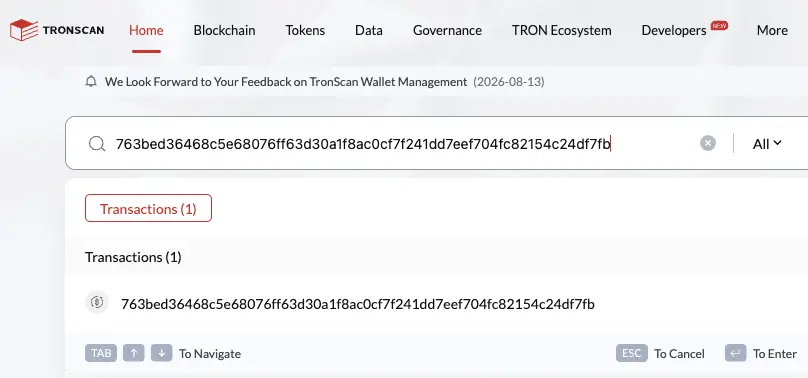
Open tronscan.org and paste the full transaction ID into the search box (“Search by Token / Account / Contract / Transaction / Block”). Click the “Transactions (1)” result that appears.
What do the fields on the transaction page mean?
The top line sums up the transfer: sender, amount and token, receiver. Below it are these fields:
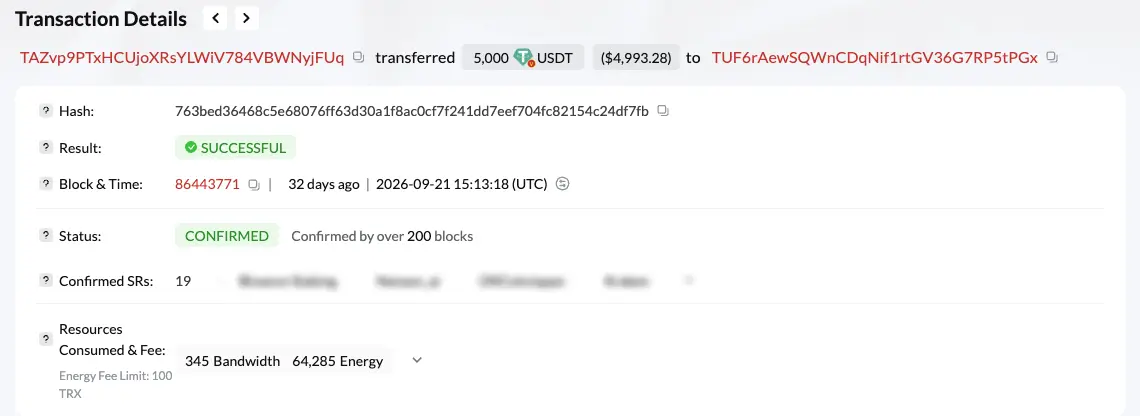
(We blurred the names of the block producers in the image; they don’t matter for checking.)
| Tronscan field | What it means | What you want to see |
|---|---|---|
| Hash | The transaction ID | The same ID you have |
| Result | Whether the transfer executed | SUCCESSFUL |
| Status | Confirmation stage | CONFIRMED (UNCONFIRMED for about a minute before that) |
| Confirmed SRs | How many Super Representatives have confirmed it | 19 |
| Owner Address | The sender | The party who sent to you |
| Contract Address | The token’s contract | TR7NHqjeKQxGTCi8q8ZY4pL8otSzgjLj6t |
| Token Transfers | Who sent, who received, how much | Your address under To, and the agreed amount |
| Amount | TRX sent along with the transaction | 0 TRX, which is normal for a USDT transfer |
Result vs Status: what’s the difference?
Result says whether the transfer executed; Status says whether it is final. TRON’s docs note that being in a block does not by itself mean success, because the result can record a failure. So read both.
According to TRON’s docs, the network makes a block about every 3 seconds, and a transaction becomes irreversible once at least 19 different Super Representatives have produced blocks at or after its block, usually about a minute. We watched this on Tronscan on 24 October 2026: a new USDT transfer showed UNCONFIRMED with Confirmed SRs at 2, then 8 after 33 seconds, then CONFIRMED with 19 after about a minute.
The rule: before handing over goods or dinars for USDT, wait for SUCCESSFUL and CONFIRMED together.
How do I make sure the token is real USDT?
On the Overview tab, look at Contract Address: the smart contract of the token that moved. It is the only thing that separates real USDT from a token with the same name.
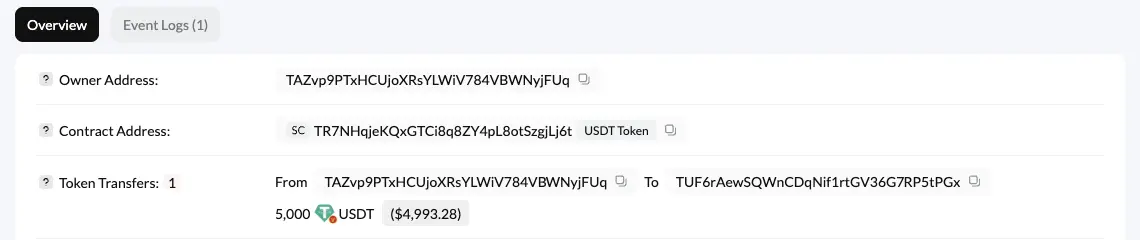
Tether’s Supported Protocols page links USDT on TRON (TRC20) to one contract: TR7NHqjeKQxGTCi8q8ZY4pL8otSzgjLj6t. Compare every character, not just the start and end. If the contract is different, the token is not Tether’s USDT, whatever its name.
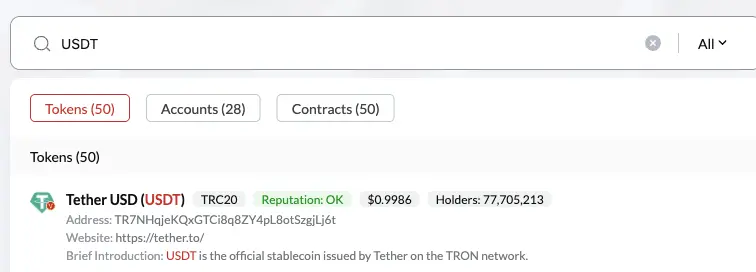
Anyone can create a token and call it USDT. A Tronscan search for “USDT” listed 50 tokens; the first was Tether USD with the official contract, a “Reputation: OK” label and a link to tether.to:
How do I see incoming transfers to my address (TRC20 transaction history)?
You don’t need a TxID to see what arrived. Paste your wallet address (starts with T, 34 characters) into the search box, then:
- Open the Transfers tab.
- Choose TRC20 to see token transfers such as USDT.
- Click the ↓ arrow to show incoming transfers only (↑ shows outgoing).
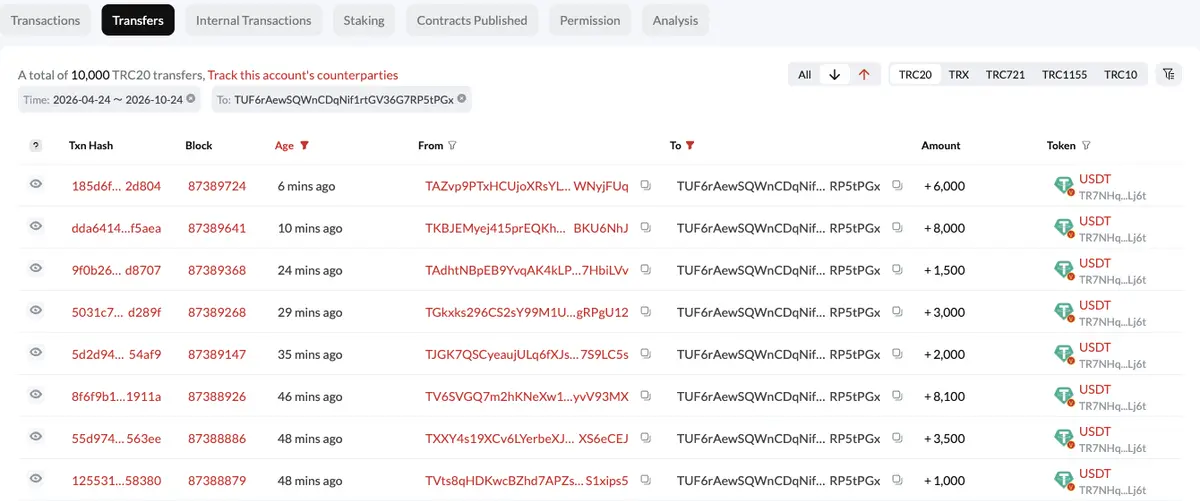
Each row shows the ID, block, age, sender, receiver, amount (+ in, − out) and token. Under the word USDT, Tronscan prints a short form of the contract: for real USDT it reads TR7NHq…Lj6t. If it shows anything else, open the transaction and compare the full contract.
Your Tokens list may also show tokens you never asked for, named after websites, with no dollar value (the example address held 53 tokens, some like this). Anyone can send a token to any address. Ignore them and don’t visit the sites they name.
If you buy USDT from Vexjo, Vexjo’s team confirms your payment, then USDT goes to your wallet automatically, and you can see the incoming transfer on your address page this way. When selling, your USDT is checked on the blockchain automatically, then Vexjo sends your dinars; you can follow your own outgoing transfer with the ↑ arrow.
Disclosure: this site is owned by Vexjo Virtual Assets LLC. About us
What does fake (“flash”) USDT look like on the explorer?
Threat-intelligence firm ZeroFox describes “flash” coins as fake crypto that disappears from the wallet, and reports sellers of fake Tether tokens saying theirs do not disappear; one said they cannot be exchanged for other crypto but work in direct one-to-one exchange scams. So a fake may sit in your wallet looking like USDT. The contract gives it away:
| What to check | Real USDT on TRC20 | Sign of a fake |
|---|---|---|
| Contract Address on the transaction page | TR7NHqjeKQxGTCi8q8ZY4pL8otSzgjLj6t | Any other contract, even if named USDT or Tether USD |
| Token column in the transfers list | USDT with TR7NHq…Lj6t under it | USDT with a different short contract |
| Name and logo | Tether USD (USDT) | Can be copied, so they prove nothing |
| Where it came from | A wallet or party you know | An offer of “cheap USDT” or “flash software” |
For the full story on this scam, read Flash USDT: how to spot it.
Why can’t I find my transaction, and what if I used the wrong network?
If Tronscan can’t find the ID:
- Different network: an ID starting with 0x is not from TRON; if the transfer was BEP20, use BscScan (next section). See TRC20 vs BEP20.
- Incomplete ID: copy it again, in full.
- Not sent yet: wait, search again, and ask the sender whether their wallet confirmed the send.
The wrong network is a costly mistake. A help page from the maker of a well-known Ethereum wallet (in the sources) says tokens sent to a network that does not work like Ethereum are most likely “gone forever”. TRON is not Ethereum-style, and its addresses start with T, not 0x. Check the network and address format before every send, and try a small amount first with a new address.
Also watch for “address poisoning”: a scammer sends a tiny or zero transfer from a lookalike of an address you used, hoping you copy it from your history. Don’t copy addresses from your history, and compare the middle characters too. More in the USDT safety checklist.
How do I check a BEP20 transfer on BscScan?
Same idea on BNB Smart Chain, with a different explorer: BscScan. Paste the transaction ID (it starts with 0x) and check:
| What to check | Tronscan (TRC20) | BscScan (BEP20) |
|---|---|---|
| Transaction ID format | 64 characters, no 0x | Starts with 0x |
| Did it succeed? | Result: SUCCESSFUL | Status: Success |
| Confirmation | Status: CONFIRMED and Confirmed SRs | Block Confirmations next to the block number |
| Token contract | TR7NHqjeKQxGTCi8q8ZY4pL8otSzgjLj6t | 0x55d398326f99059ff775485246999027b3197955 |
| The real receiver | Token Transfers: To | The BEP-20 Tokens Transferred section: To |
Careful: on BscScan the To field at the top can show the token contract, not the receiver. The real receiver and amount are in the BEP-20 Tokens Transferred section.
Tether lists no USDT contract on BNB Smart Chain. The token people call “USDT BEP20” is shown on BscScan as BSC-USD, a pegged token issued by another company, not Tether. Compare the contract, not the name.
Sending USDT to someone outside Jordan? Give them the transaction ID so they can check it themselves; see sending USDT abroad. To pick a wallet, see the USDT wallet guide.
Frequently asked questions
How do I check a USDT TRC20 transfer?
Open Tronscan and paste the transaction ID (TxID) into the search box. Make sure Result shows SUCCESSFUL and Status shows CONFIRMED, then check the receiving address, the amount and the token contract TR7NHqjeKQxGTCi8q8ZY4pL8otSzgjLj6t.
Where do I find the transaction ID (TxID)?
In your wallet: open the transfer in your transaction history and copy the value labelled TxID or Hash. If you are the receiver and don't have it, ask the sender, or open your own address page on Tronscan and find the incoming transfer there.
How long does a TRC20 transfer take to confirm?
TRON's docs say the network makes a block about every 3 seconds and a transaction becomes irreversible after about a minute. In our test on Tronscan, a new transfer changed from UNCONFIRMED to CONFIRMED after about one minute.
What does UNCONFIRMED mean on Tronscan?
The transaction is in a block, but the number of confirming Super Representatives (Confirmed SRs) has not yet reached 19, the number at which TRON's docs say a transaction becomes final. Wait about a minute, refresh, and don't hand anything over before you see CONFIRMED.
How do I know the USDT I received is real?
Look at the token contract (Contract Address) on the transaction page, not the name or logo. The USDT contract Tether lists for TRON is TR7NHqjeKQxGTCi8q8ZY4pL8otSzgjLj6t; any other contract is not Tether's USDT.
Why can't I find my transaction on Tronscan?
First make sure the transfer is on TRON: a TRON TxID is 64 characters and does not start with 0x. A hash that starts with 0x belongs on BscScan if the transfer was BEP20. Also check you copied the whole ID, then wait a little and search again.
Can a USDT transfer be reversed after it confirms?
No. TRON's docs say a solidified transaction is irreversible, so check the address and the network before you send, not after.
Sources
- USDT transaction page (the example in the screenshots)
- A new USDT transaction page (UNCONFIRMED to CONFIRMED)
- TRON address page: Transfers tab
- Tether USD (USDT) token page on TRON
- Supported Protocols
- Architecture overview
- Confirmation semantics
- Account
- Resource Model
- BSC-USD (BEP-20) token page
- BSC-USD transaction page (example of BscScan fields)
- Flash, Fake Tether Cryptocurrency Tokens Announced for Sale
- Funds sent on wrong network
- Address poisoning scams